

 CN
CN

 Back
Back 

The SK-R800 Series 80GHz Radar Level Transmitter is a high-precision level measurement device from Shengke Electronics, supporting dual-mode commissioning via both panel keypad and Bluetooth APP. It is suitable for complex process measurement of liquid and solid media. This guide covers the full workflow from initial power-up to acceptance and handover, enabling fast on-site deployment and calibration.
Part 1 – Basic On-Site Commissioning Procedure
After completing device installation and preliminary electrical checks, follow the steps below:
1. Initial Power-Up and Cold Start
Apply power and confirm that the instrument display lights up normally and enters the main display screen. Check for any abnormal alarm codes (fault code descriptions are covered in Part 4 of this guide). If there is no display after power-up, first inspect the power supply circuit and terminal connections.
2. Core Parameter Configuration
Enter the [Basic Settings] menu via the panel keypad or Bluetooth APP and configure the following parameters:
| Parameter | Description |
|---|---|
| Medium Type | Select Liquid or Solid based on the measured medium; the instrument will automatically apply the corresponding algorithm |
| Display Unit | Choose meters, millimeters, feet, or inches as required |
| Blind Zone | Set the non-measuring zone near the antenna to avoid fixed interference from mounting nozzles and other structures |
| Measuring Range | Set the effective measuring range, which must exceed the actual level variation range (for conical-bottom tanks, add 1–2 m beyond tank height) |
| High Level / Low Level | Correspond to the empty-tank and full-tank levels respectively; used for percentage and graphical display |
| 4 mA / 20 mA Position | Default: 4 mA = empty tank (High Level), 20 mA = full tank (Low Level). It is not recommended to modify these independently — adjust through the High Level / Low Level settings instead |
3. Signal Commissioning and Optimization
Press [ESC] to enter the echo curve screen and perform signal quality assessment and optimization:
True Echo Verification – Check that a significant, stable peak exists at the actual level distance. Signal strength must be well above the noise baseline. (Media with a dielectric constant > 4 will yield better signal quality.)
Gain Adjustment – If the true echo is weak, moderately increase the gain in [Advanced Parameters]. Avoid setting gain too high, as this will amplify noise.
False Echo Suppression – For fixed interference peaks caused by tank walls, supports, or other structures, use the [False Echo] function to mark their positions; the instrument will then automatically suppress those interference signals.
4. Output Calibration and Acceptance Verification
After completing parameter configuration, verify analog output accuracy:
Empty-Tank Verification – With the tank empty, confirm that the instrument output current is approximately 4 mA and that the displayed value matches the configured High Level.
Full-Tank / Known-Point Verification – At full tank or a known level, confirm that the output current and displayed value match actual process conditions.
Control System Check – Use the [Simulation] function to force a specific output current and verify that the DCS/PLC side is receiving the signal correctly.
Part 2 – Wireless Commissioning via Bluetooth APP (Radar Me)
The SK-R800 Series integrates a Bluetooth 5.1 low-power module, supporting wireless commissioning within a 20-meter line-of-sight range. This is particularly well-suited for elevated, hazardous, or otherwise difficult-to-access installation locations.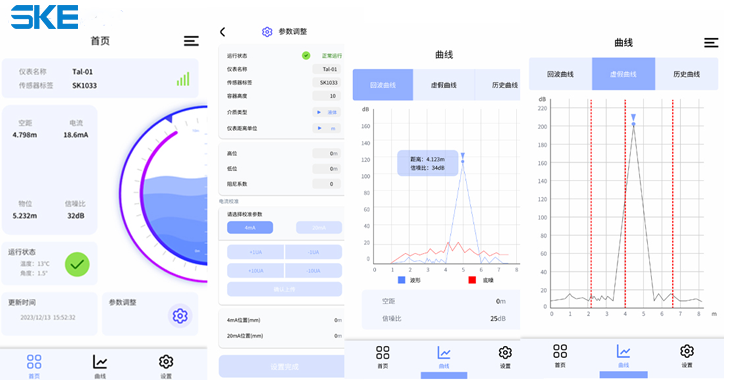
1. Setup and Connection
App Download – Search for "Radar Me" in your device's app store and install it.
Pairing Procedure – Power on the instrument (Bluetooth activates automatically) → Enable Bluetooth on your phone and launch the app → Search for the device named "SK-R800_XXXX" → Enter the default pairing password 000000 → Connection established.
2. Core Interface Overview
| Screen | Key Functions |
|---|---|
| Home | Real-time display of current (mA), signal-to-noise ratio, empty distance, level, Bluetooth signal strength, and operating status |
| Parameters | Quick adjustment of high/low level, units, damping coefficient, and 4–20 mA current calibration |
| Echo Curve | View live echo, false echo, and historical curves to assess signal quality |
| Settings | Full parameter configuration including basic parameters, system settings, and advanced settings |
| System Settings | Manage Bluetooth password, app language, version updates, and factory reset (unrelated to radar device commissioning) |
3. Common Operation Examples
Modify Measuring Range – Connect to device → Enter [Settings] → [Basic Parameters] → [Range] → Enter new value → Tap "Confirm Setting"
View Echo Curve – Connect to device → Tap the "Curve" screen → Wait 2–3 seconds for data to load → Compare against historical curves to diagnose issues
4. Safety Precautions
Notify all relevant on-site personnel before commissioning to prevent unintended interference with production.
Commissioning in hazardous areas must comply with explosion-proof requirements; use only the official dedicated app.
Do not connect multiple phones to the same device simultaneously, as this may cause frequent disconnection and reconnection.
Part 3 – Panel Keypad Operation
The instrument is equipped with 4 physical keys and a 128×64 dot-matrix LCD supporting both Chinese and English display. The core operating logic is as follows:
1. Key Functions
| Key | Function |
|---|---|
| ESC | Enter echo curve screen / Exit current menu / Return to main screen |
| ↑ / ↓ | Navigate menu items up and down / Cycle through parameter values |
| OK | Enter settings screen / Confirm parameter changes |
2. Three Main Screens
Main Display Screen – Default screen; shows real-time level, empty distance, internal temperature, fault codes, and a level bar graphic.
Echo Curve Screen – Accessed by pressing [ESC]; X-axis shows distance, Y-axis shows signal strength. Used for diagnosing measurement anomalies.
Menu Screen – Accessed by pressing [OK]; contains five top-level menus: Basic Settings, Display, Diagnostics, Advanced Settings, and Factory Settings.
3. Key Menu Settings
Damping Coefficient – Smooths sudden changes in measurement output; recommended for applications with significant level fluctuation.
Echo Threshold – Default 10 dB; a higher value improves interference rejection, but must remain below the actual echo amplitude.
Current Simulation – Navigate to [Diagnostics] → [Simulation] to force a fixed output current for troubleshooting output loop faults.
Factory Reset – Navigate to [Factory Settings] to restore defaults; resolves device abnormalities caused by incorrect parameter changes.
Part 4 – Common Faults and Troubleshooting
When a fault occurs, the main screen displays a hexadecimal fault code. Use the following table and procedure to diagnose and resolve the issue.
1. Fault Code Reference
| Fault Code | Description | Initial Response |
|---|---|---|
| E01 | Device self-test failure | Power cycle the device; contact after-sales support if the issue persists |
| E02 | RF module abnormality | Check for antenna damage or contamination; restart the instrument |
| E04 | No target detected | Check whether the level is below the blind zone or the medium's dielectric constant is too low; review echo curve |
| E08 | Level out of range | Verify range settings against actual level height |
| E10 | Level value jumping | Check process stability; increase the damping coefficient as appropriate |
| E40 | Installation angle deviation | Recalibrate vertical alignment and re-secure the device |
| E80 | Ambient temperature out of range | Ensure the device operates within −40 °C to +80 °C |
2. General Fault Response Procedure
Identify – Confirm the fault code and observed symptom via the display or control system.
Diagnose – Cross-reference the fault code table to determine the probable cause.
Safeguard – If the instrument controls a critical process, switch to manual safe mode.
Resolve On-Site – Carry out the appropriate corrective action (clean antenna, adjust parameters, inspect wiring).
Escalate – If the issue cannot be resolved, document the fault code and on-site observations, then contact technical support.
Part 5 – Commissioning Acceptance and Documentation
Upon completion of commissioning, fill out the official commissioning record form, documenting the instrument serial number, installation location, key parameter settings, empty- and full-tank verification data, signal quality assessment, and any faults encountered and resolved. Obtain the customer's signature to formally complete acceptance. Retaining the commissioning record facilitates future maintenance and fault tracing.
Proper commissioning is the foundation of long-term, stable radar level meter operation. For complex process challenges, visit the Shengke Electronics website to download the complete commissioning manual and installation videos, or contact the technical team for one-on-one free process diagnostics and customized measurement solutions.

